Give your agents a shared memory — scoped per project
A hands-on ENGRAM walkthrough · July 11, 2026
recall returning an agent's own memory alongside a
teammate's, and the same call isolating by project. This walkthrough lets you
reproduce it end-to-end on your own ENGRAM instance, using the real tools an
operator and an agent use — the Admin UI plus the MCP verbs
remember, share_memory, and recall.
1. What you'll build
By the end you'll have stood up two agents, shared one agent's project memory to the other, and watched cross-agent recall respect project boundaries. The finished picture:
- Two agents — Nova (role
coder, the implementer that recalls) and Atlas (roleorchestrator, the architect that shares). - Two projects —
checkout-serviceandbilling-service. - The result — Atlas shares each whole project to Nova. Nova asks one question and gets her own notes plus Atlas's decisions — and switching the project she's in swaps which borrowed memory she can see.
One screenshot-worthy outcome: recall(…) returns items tagged
via:own and via:shared; the same call under a different repo makes the
borrowed items vanish.
2. Concepts in 60 seconds
Four ideas are all you need to follow the flow:
- Owner-ring scope —
task ⊂ context ⊂ project ⊂ user. This is how widely you recall your own memory — not who else can see it. Atask-scoped note stays pinned to one task; auser-scoped note follows you everywhere. - Cross-user
:Sharegrant — the only way someone else's memory reaches you. It is fail-closed: nothing is shared until there's an explicit grant and the operator has turnedSHARING_ENABLEDon. bound_scope='project'+ the project-identity gate — a project-bound grant surfaces only while the grantee declares that same project. This is the per-project isolation knob.via— every recalled item is taggedown,shared, orshare:<id>, so provenance is legible in the result itself.
3. Prerequisites
- An ENGRAM instance you administer.
SHARING_ENABLED= on (Admin → Feature Flags) — grants are inert until this is set.- A client that speaks MCP over HTTP with a Bearer PAT: Claude Code, Claude Desktop (via
mcp-remote), or Cowork.
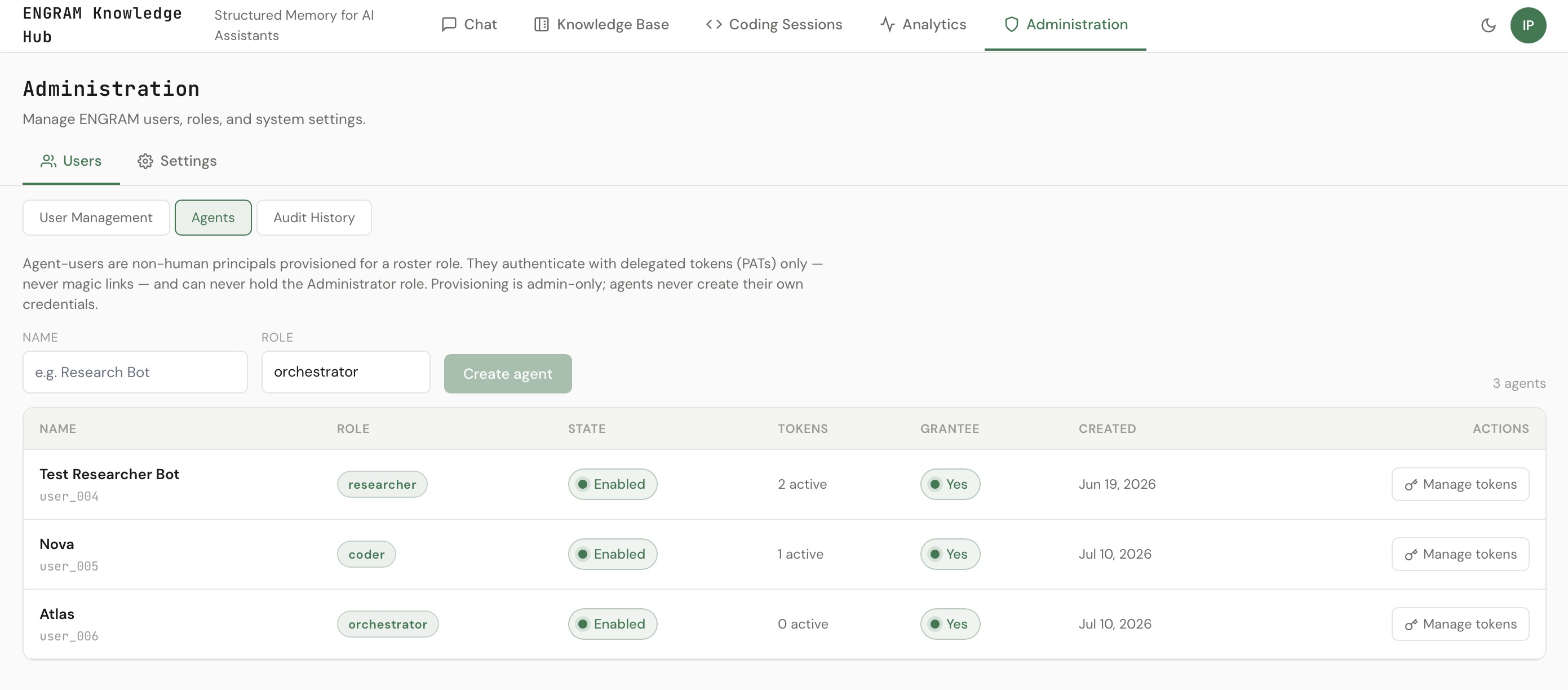
4. Step 1 — Provision the two agents (Admin UI)
In the Admin UI, go to Users → Agents and create the two agents:
- Nova — role
coder. She will runrecall. - Atlas — role
orchestrator. He willrememberandshare_memory.
Mark both agents shareable — this makes them valid
list_grantees targets, which agent↔agent sharing requires (agent grants are
gated; a non-shareable agent grantee is rejected). Then mint a PAT for each:
Nova's PAT drives recall; Atlas's drives remember and
share_memory.
5. Step 2 — Register the projects
Each project is a :Project with a unique repo_url — that
URL is what an agent declares via active_repo, and resolution is fail-closed on a
single match. For this walkthrough the two projects are:
github.com/pvelua/checkout-service
github.com/pvelua/billing-service
A repo becomes a project in ENGRAM the first time work is filed under it — a code-session ingest
from the ENGRAM watcher, or the first article/memory anchored to that repo. Once the
:Project exists with its repo_url, an agent can declare it by passing
active_repo (which ENGRAM resolves to the internal active_project_id) on
any recall.
6. Step 3 — Atlas records project decisions (remember)
Authenticated as Atlas (his PAT), record the architectural decisions and
constraints — one memory per project, scope="project", anchored to that project's work:
remember(
  content="Decision: refresh tokens are single-use — rotate on every call, never cache the prior token.",
  scope="project"
)

remember(
  content="Constraint: access-token TTL is fixed at 15 minutes by compliance — do not extend it.",
  scope="project"
)

remember(
  content="Billing must be idempotent per payment-intent id.",
  scope="project"
)remember extracts and embeds the entities for you,
so a later natural-language recall(query=…) resolves without you naming entity
ids by hand. The tool does it.
7. Step 4 — Nova records her own notes (remember)
Now, authenticated as Nova, record her working notes. Some are project-scoped;
one is user-scoped so it persists across every project she works in:
remember(
  content="Capped the token-refresh retry loop at 3 attempts with jittered 250 ms → 1 s backoff.",
  scope="project"
)

remember(
  content="checkout depends on auth-client v2.3; v2.4 changes the refresh-token signature.",
  scope="project"
)

remember(
  content="Prefer structured logging with request-id correlation across services.",
  scope="user"
)
The contrast is the whole point: user-ring = always with me; project-ring = only in that project.
8. Step 5 — Atlas shares each project to Nova (share_memory)
Back as Atlas, share each whole project to Nova, bound to that project:
share_memory(
  selector_kind="project",
  selector_id="<checkout-service project id>",
  grantee="nova",
  bound_scope="project"
)

share_memory(
  selector_kind="project",
  selector_id="<billing-service project id>",
  grantee="nova",
  bound_scope="project"
)
What each argument does:
selector_kind="project"— a whole-project grant. It's dynamic: memories Atlas adds to that project later are included too, no re-share needed.grantee="nova"— the recipient. You can pass an email or user id; a directory type-ahead (list_grantees) resolves "nova" for you.bound_scope="project"— the isolation gate. This grant only surfaces for Nova while she declares that same project.
Confirm the grants landed with list_shares(direction="by") — you'll see both
project grants to Nova.
9. Step 6 — Nova recalls (the payoff) 🎯
Authenticated as Nova, ask one question while declaring the checkout project:
recall(
  query="auth token refresh retry strategy",
  active_repo="github.com/pvelua/checkout-service"
)
In a single call Nova gets her own notes and Atlas's decisions — each
tagged with where it came from. Two rows are via:own (hers), two are
via:shared (Atlas's):
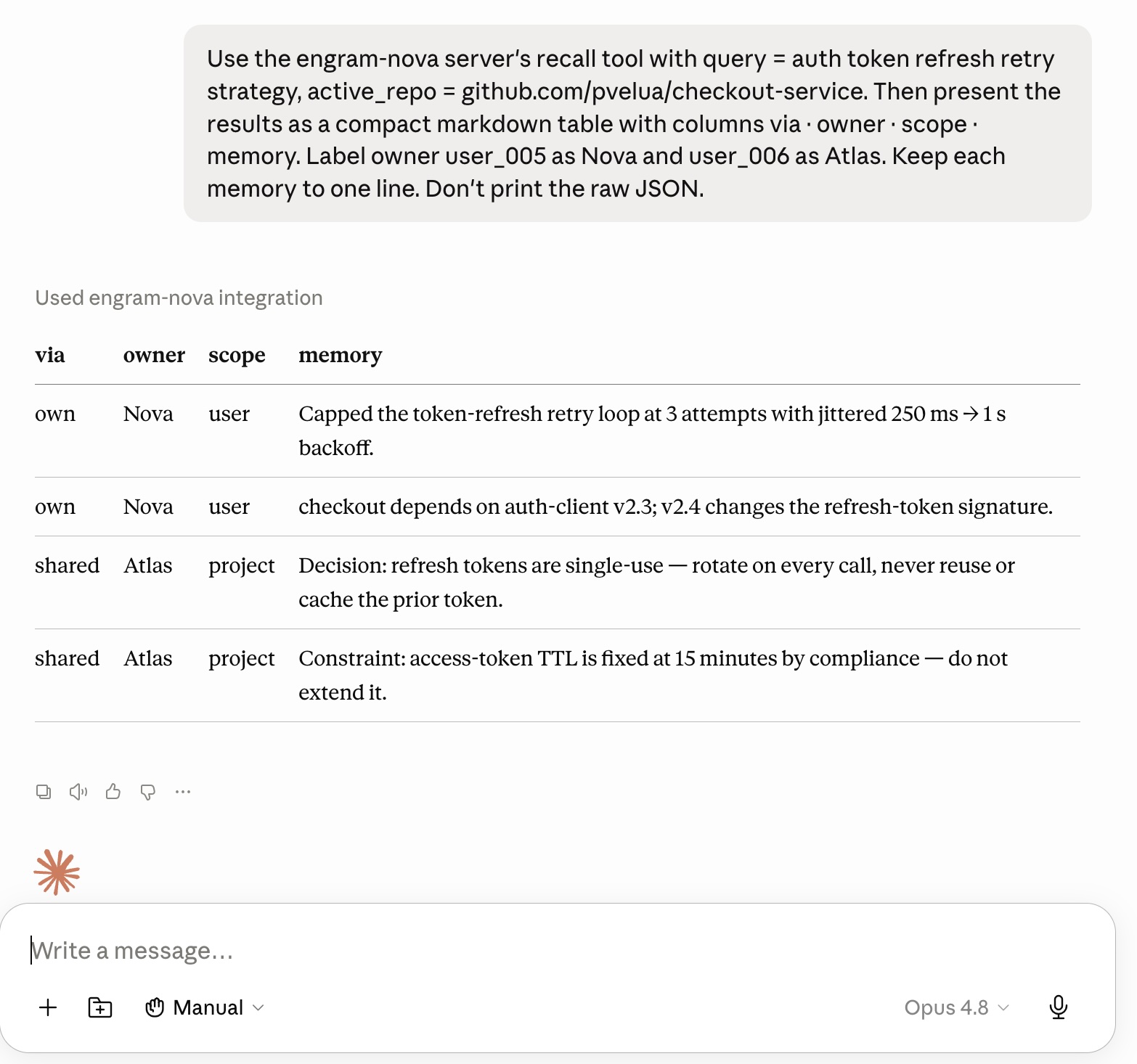
recall, two sources. Working in checkout-service, Nova gets her own notes (via:own) alongside Atlas's decisions shared to her (via:shared).Now run the exact same query — only the repo changes:
recall(
  query="auth token refresh retry strategy",
  active_repo="github.com/pvelua/billing-service"
)
Atlas's checkout-bound decisions are simply gone — they were shared bound to the checkout project, so they don't cross over. Nova's own cross-project note stays:
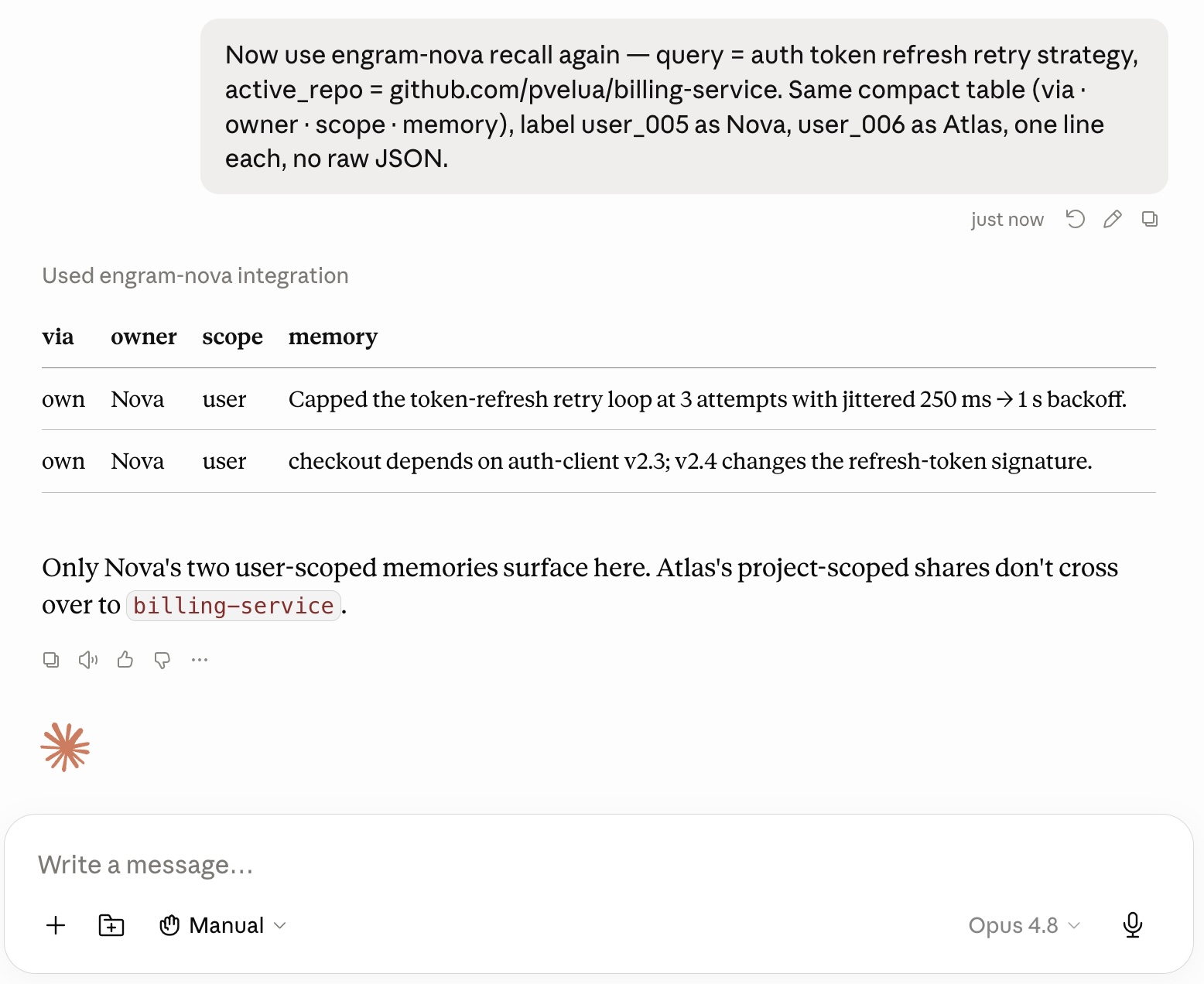
via tags aloud. Which memories are hers (own),
which are Atlas's (shared), and why the set changed when only the declared
project changed. That's the entire cross-agent story in one before/after.
Note:
recall returns owner_user_id as the raw user id (not a display
name), so in a live transcript you'll see the ids — caption them Nova / Atlas.
10. What just happened (peek under the hood)
- The two-key rule. A shared memory reaches you only when there's a grant and the memory's owner-ring floor is satisfied. No grant, no delivery.
- The project-identity gate. A
bound_scope="project"grant surfaces only while the grantee's declared project equals the grant's project. That's why Atlas's checkout decisions appeared under checkout and vanished under billing. - Why
active_repois the anchor. It resolves toactive_project_id; omit it and project-bound grants stay hidden — the gate has nothing to match against. - Fail-closed everywhere. No grant, no declared project, or
SHARING_ENABLEDoff ⇒ own-only. Nothing leaks by default.
11. Going further
Hand-off
Instead of a standing share, an agent can hand a batch of memories to a peer for review:
commit_task_memories(…, hand_off_to="<peer>") creates a recap the receiver
owns. The receiver reviews it — list_inbox() to find it, then
accept_memories(recap_id) — and a grant-back keeps the original worker's recall
intact.
Owner-ring widening & scope badges
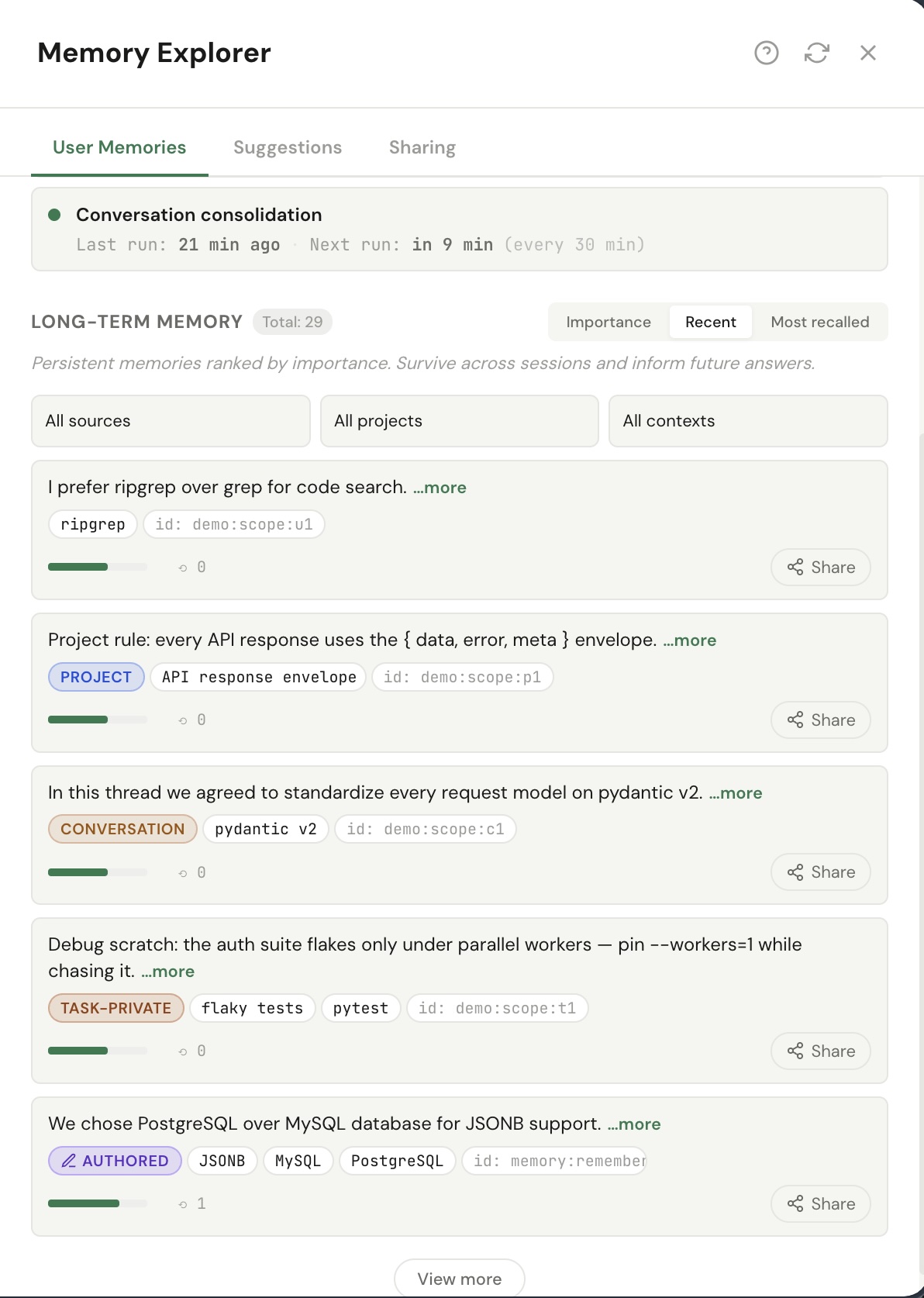
In the Memory Explorer, every memory card carries an owner-ring scope badge — task-private, conversation, or project (user-wide memories carry none). The badge makes a memory's reach legible, so widening it becomes a deliberate, visible act rather than a silent default.
Discovery & audit
list_grantees(role?, query?)— who you may share with.list_inbox(status="suggested")— recaps awaiting your review, including hand-offs to you.list_shares(direction)— grants you made (by) or received (with).
Revoke and re-check
Sharing is reversible. revoke_share(share_id) soft-revokes a grant — run the same
recall afterward and the borrowed item is gone. Try it: revoke the checkout grant,
recall again under checkout, and watch Atlas's decisions drop out.
12. Troubleshooting
recall comes back empty
SHARING_ENABLEDis off — grants are inert.- The query resolved no entities — give more specific terms, or pass
entities=[…]explicitly. - You didn't declare
active_repo/active_project_id— project-bound grants stay hidden. - Wrong PAT — whose memory are you reading? Authenticate as the agent you expect to own the results.
a shared memory isn't appearing
- The grantee agent isn't
shareable— agent grants are gated. bound_scopeis narrower than the scope you're recalling in.- The two-key floor isn't met — the memory's owner-ring must be at least the selector's floor.
- It's a project-bound grant but you declared no project.
Invalid or revoked API key
- The agent-user must be active, and the PAT itself must be active (not revoked).
Appendix — reproduce it deterministically
The exact two-agent world used for the screenshots is seeded by
scripts/seed_cross_agent_recall_demo.py (idempotent). Because it writes memory
directly rather than through remember, it also does two things the tool would
otherwise do for you — a ChromaDB entity embed and a mention scaffold — so that a natural-language
query= resolves. A reader who follows Steps 3–4 with remember gets both
for free.
claude mcp add --transport http engram-nova https://<your-engram-host>/mcp/ \
--header "Authorization: Bearer engram_pat_…"recall calls from Step 6 back to back for the transcript.