Documentation
MCP Server setup, the 12 ENGRAM tools, your Settings panel, the bundled Claude Code slash commands, and Cowork autonomous gap closure.
1. MCP Server
ENGRAM exposes an MCP (Model Context Protocol) server so your local agents — Claude Code, Claude Desktop, or any other MCP-compatible client — can read, search, and write articles in your knowledge base. The same tools also drive coding-session ingest, external-conversation capture, and the Knowledge Gaps closure loop.
The ENGRAM MCP server lives at https://engram.pvelua.net/mcp/ (the trailing
slash is required). It authenticates per-user via a Personal Access Token (PAT) you mint
from your Settings panel.
1.1 Configuration
Step 1 · Mint a PAT
Sign in to ENGRAM, click your avatar (top-right), open Settings → API Keys,
and click + Create Key. Give it a memorable name (e.g.
"Claude Code on MacBook") and copy the engram_pat_… token
immediately — the raw key is shown only once. If you lose it, just create
a new one and revoke the old.
See §2.2 API Keys for the full panel walkthrough.
Step 2 · Claude Code
Claude Code speaks MCP over HTTP natively — no wrapper needed. Run this once from any
terminal (the -s user flag scopes the registration globally so it works
from any project):
claude mcp add -s user --transport http engram-kb \
  https://engram.pvelua.net/mcp/ \
  --header "Authorization: Bearer engram_pat_your_token_here"
Verify with claude mcp list — the engram-kb entry should report
✓ Connected. Restart any open Claude Code session for the new server to load.
~/.claude.json,
export it as a shell env var first (export ENGRAM_PAT=engram_pat_…),
then reference it in the header. Note that claude mcp add resolves env
vars at registration time and bakes the literal value into the config — for true
"no plaintext at rest", scope the registration to a project
(-s project) and gitignore the resulting .mcp.json.
Step 3 · Claude Desktop
Claude Desktop's built-in MCP runtime is stdio-only for non-public servers, so we use
mcp-remote — a small npm package that runs as a local stdio process and
relays JSON-RPC to a remote HTTP MCP endpoint. Edit your
claude_desktop_config.json (see paths below) and add this entry:
{
  "mcpServers": {
    "engram-kb": {
      "command": "/usr/local/bin/npx",
      "args": [
        "mcp-remote",
        "https://engram.pvelua.net/mcp/",
        "--header",
        "Authorization: Bearer ${ENGRAM_PAT}"
      ],
      "env": {
        "ENGRAM_PAT": "engram_pat_your_token_here"
      }
    }
  }
}
Config file location:
- macOS:
~/Library/Application Support/Claude/claude_desktop_config.json - Windows:
%APPDATA%\Claude\claude_desktop_config.json
Restart Claude Desktop after editing. The MCP indicator (Settings → Developer) should show engram-kb as connected.
/mcp/ is load-bearing
(no slash → 307 redirect that the JSON-RPC client doesn't follow).
And command needs an absolute path to npx — Claude Desktop
launches with a stripped PATH so a bare npx won't resolve.
which npx in your terminal tells you the right path
(Homebrew installs put it at /usr/local/bin/npx on Intel Macs or
/opt/homebrew/bin/npx on Apple Silicon).
1.2 MCP Tools
ENGRAM exposes 12 MCP tools across five capability groups. Each tool is callable by the agent as soon as the server is registered — you don't import or list them explicitly. Just describe the task in natural language ("save this draft to my KB", "find articles related to X") and the agent picks the right tool.
(repository, file_path). Idempotent — re-runs produce a superseding version, not a duplicate.Key params:
title, content_markdown, repository, file_path.Example: "Sync docs/architecture.md to my ENGRAM KB."
Key params:
title, content_markdown, optional source_agent, tags, reason.Example: "Draft a comparison of vector databases and save it as a new ENGRAM article."
Key params:
query, limit (default 10).Example: "Search my KB for articles about authentication."
Key params:
query, limit (default 10).Example: "Find ENGRAM articles related to vector database comparisons."
version and is_latest so the agent knows whether it's reading current content.Key params:
article_id.
creation_trigger, since, and tag filters.Key params:
limit, optional creation_trigger, since, tag.
:CodeSession + :CodeRecap + :CodeAction nodes.Key params:
session_id (the JSONL filename UUID; the server finds it under ~/.claude/projects/).Note: requires the operator to enable code-session ingest globally.
find_related_articles but over your coding history.find_related_articles.Key params:
query, limit (default 10).Example: "What did I do about Neo4j connection pooling in past sessions?"
Key params:
summary, source_agent, external_project, conversation_ref, optional related_repo, tags.Pattern: call this first to register the external conversation, then pass the same
(source_agent, external_project, conversation_ref) tuple as source_conversation_ref on a subsequent create_article/sync_article call for end-to-end provenance.
:GapItem nodes) — topics where the KB has thin coverage or known retrieval failures.Key params: optional
type, severity, status, limit.
Key params:
item_id, action_type, plus context fields like proposed_title, draft_excerpt, draft_markdown.
action_type specifies.Key params:
proposal_id.
2. Settings
Your Settings panel is where you manage your account, mint PATs for MCP clients, and label the machines that have ingested your Claude Code sessions. Open it from the avatar menu (top-right of the app) — it appears as a drawer with three tabs.
2.1 Profile
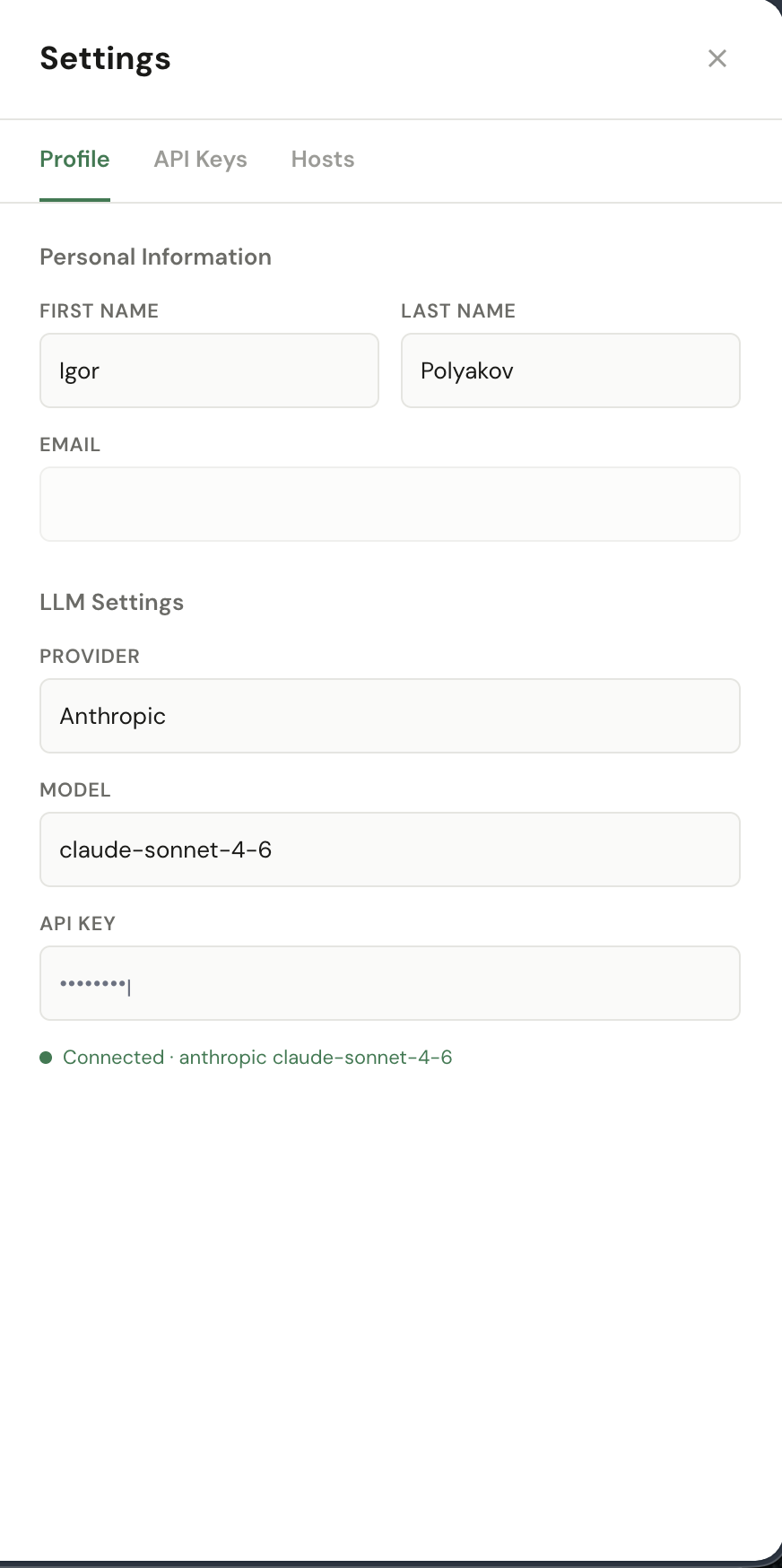
Personal Information — first name, last name, email. Used by the app for greetings and for the audit log when you take admin actions.
LLM Settings — your "bring-your-own-LLM" configuration. ENGRAM uses your provider + model + API key for response generation and article authoring; everything else (entity extraction, summarisation, community labels) runs on the operator's Anthropic budget by design.
- Provider: Anthropic, Google, or OpenAI.
- Model: picked from the provider's catalogue (e.g.
claude-sonnet-4-6,gemini-2.5-pro,gpt-5). - API key: stored masked; only the last few characters are shown back to you. The green Connected indicator means ENGRAM has successfully reached your provider with the key.
2.2 API Keys
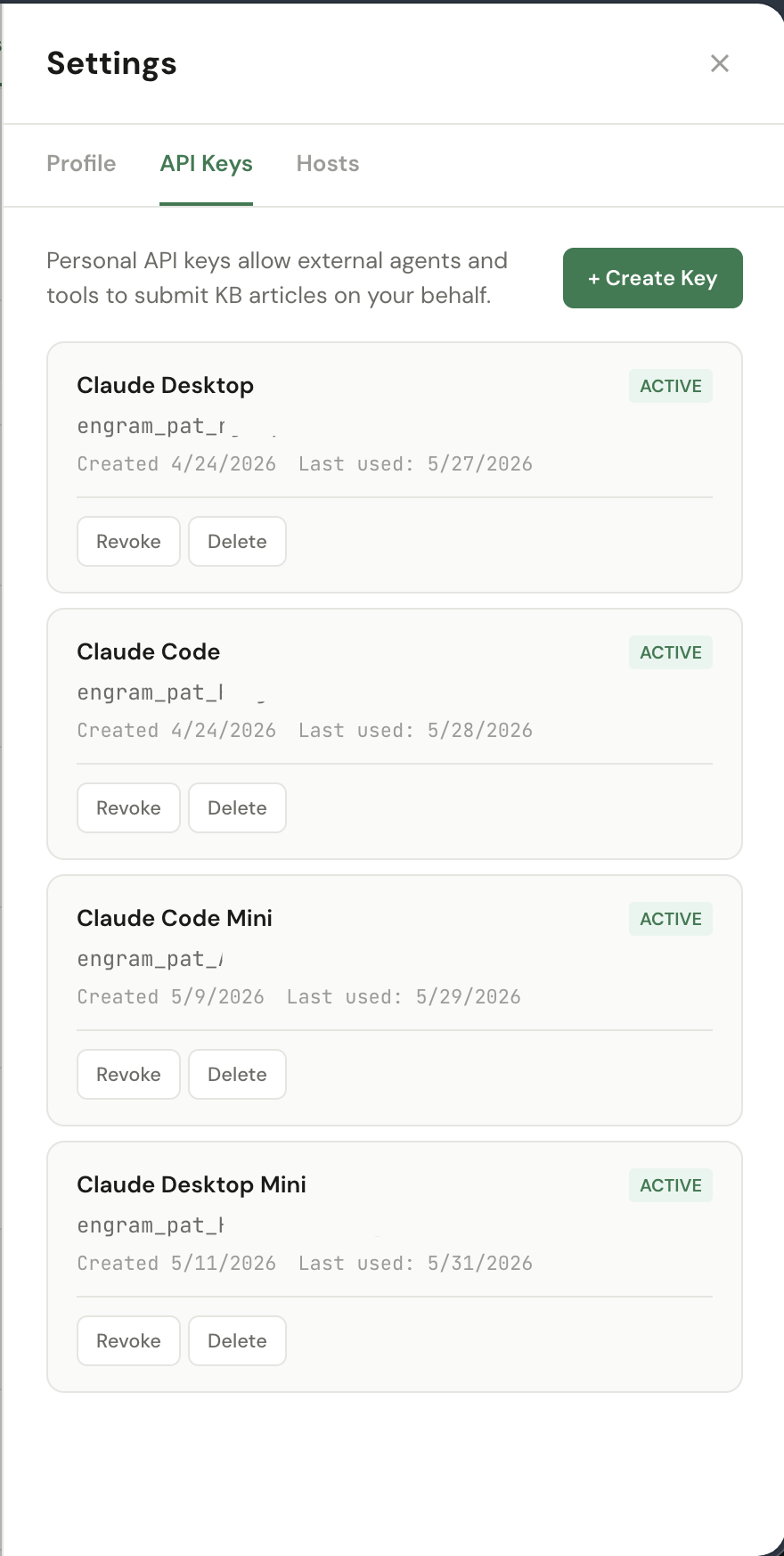
Personal Access Tokens (PATs) let external agents — Claude Code, Claude Desktop,
and the engram-watcher CLI — call ENGRAM on your behalf. Each token authenticates
as you: anything it does shows up in your audit history.
Create a PAT
Click + Create Key, give it a name that identifies where you'll use it
(e.g. "Claude Code — MacBook", "Claude Desktop — Work"),
and confirm. ENGRAM shows the full engram_pat_… token once.
engram_pat_rjkcy…2wCM) for identification.
Revoke vs Delete
- Revoke: immediately invalidates the token — any further request returns 401. The row stays in the list (now marked Revoked) so the audit history retains the name and creation context. Use this when you suspect a token has leaked or you're rotating credentials.
- Delete: removes the row entirely. Equivalent to "revoke + forget" — pick this once you're sure you'll never need the row for forensic context. Already-revoked tokens are also safe to delete.
Each row shows Created and Last used dates — useful for spotting tokens that haven't been touched in a while (candidates for cleanup) or, conversely, tokens that are seeing unexpected traffic.
2.3 Hosts
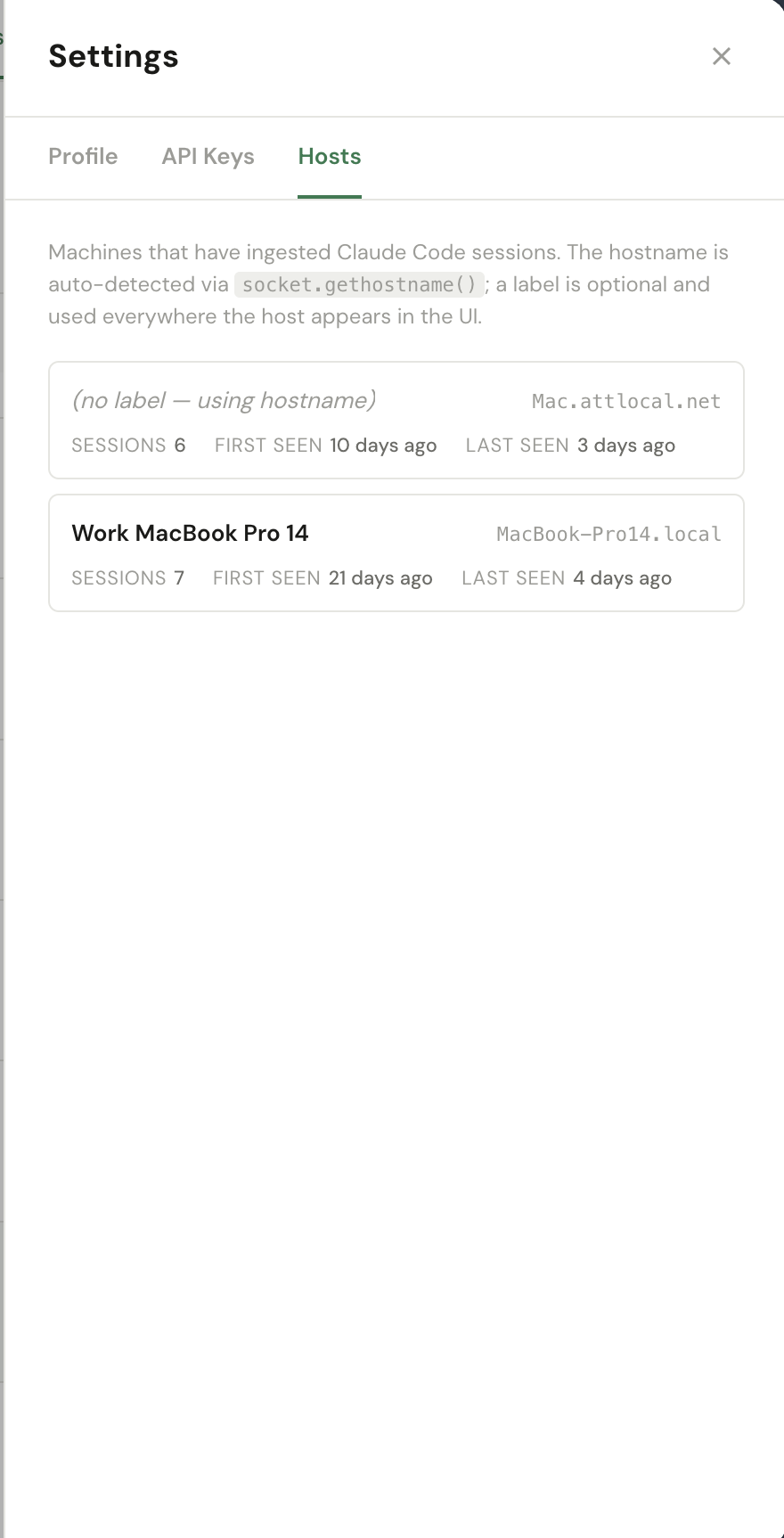
The Hosts tab lists every machine that has uploaded a Claude Code session
to your KB via the engram-watcher CLI. Each row is auto-created the first time
a host posts a session — the hostname comes from socket.gethostname() on the
sending machine.
Label — click on a host's name to give it a friendlier display name
(e.g. "Work MacBook Pro 14" for MacBook-Pro14.local). The label is
used everywhere the host appears in the UI: the Coding Sessions panel, the Project insights,
and host-grouped filters. The raw hostname stays as the system-level identifier.
Sessions / First seen / Last seen — counters and timestamps maintained by the ingest pipeline. Useful for spotting hosts that have gone quiet (laptop in storage, watcher daemon stopped) or for confirming a freshly installed watcher is talking to ENGRAM.
engram-watcher CLI produce Hosts rows. If you've registered a PAT but
haven't installed the watcher yet, this tab stays empty — that's expected.
3. Claude Code Commands
ENGRAM ships with five Claude Code slash commands that wrap the most common KB
workflows. Each one is just a markdown prompt that Claude Code runs when you type
/<name> in any session — they don't add new MCP tools, they
compose the tools you already have. Install once, use everywhere.
3.1 Installing a command
Slash commands live in one of two folders, depending on whether you want them global or per-project:
- Global (available in every project) —
~/.claude/commands/<name>.md - Per-project (only when you're inside that repo) —
<repo>/.claude/commands/<name>.md
To install any of the five commands below, copy the markdown into a file with the
corresponding name. For example, to add /find-in-engram-kb globally:
mkdir -p ~/.claude/commands
# paste the markdown for /find-in-engram-kb (shown below) into this file:
$EDITOR ~/.claude/commands/find-in-engram-kb.md
Claude Code picks up new commands without a restart — open a fresh session and
type / to confirm /find-in-engram-kb appears in the
autocomplete list.
engram-kb MCP server is registered — see §1.1
Configuration. The commands have a curl fallback for the rare case
where MCP isn't reachable, but the MCP path is the primary one.
3.2 /add-to-engram-kb
One-shot import of a local file into the KB as a brand-new article. Use this when the
file is a one-off — a paper you just wrote, a meeting transcript, a research note that
won't get re-iterated. For files that will get edited and re-synced over time,
prefer /sync-to-engram-kb — it produces
superseding versions instead of duplicates.
Read the file at $ARGUMENTS and add it to the ENGRAM Knowledge Base.

Steps:
0. **Capture conversation provenance.** Call the `record_external_conversation` MCP tool with:
   - `source_agent`: `"claude_code"`
   - `external_project`: the git repository name (same as step 3 — the git remote owner/name)
   - `conversation_ref`: the current Claude Code session ID
   - `summary`: 1–2 sentences describing what this conversation worked on and what role this file plays in it
   - `related_repo`: same as `external_project` for git-rooted work

   The call is idempotent — re-running it for the same session appends to the existing conversation rather than creating a duplicate. Skip this step ONLY when adding a pre-existing file whose authorship predates the current conversation.
1. Read the file content at the path specified
2. Extract the title from the first `# ` heading in the file. If no heading exists, use the filename without extension as the title
3. Determine the current git repository name using `git remote get-url origin` or the directory name
4. Use the ENGRAM KB MCP tool `create_article` with:
   - title: the extracted title
   - content_markdown: the full file content
   - source_agent: "claude_code"
   - repository: the git repository name
   - file_path: $ARGUMENTS
   - reason: "Added via /add-to-engram-kb command"
   - source_conversation_agent: `"claude_code"` (only when step 0 was performed)
   - source_conversation_external_project: same value as step 0's `external_project` (only when step 0 was performed)
   - source_conversation_ref: same value as step 0's `conversation_ref` (only when step 0 was performed)
5. Report success: confirm the article was created with its title and article_id

If the MCP tool is not available, fall back to a direct API call:
```bash
curl -s -X POST https://engram.pvelua.net/api/articles \
  -H "Authorization: Bearer $ENGRAM_PAT" \
  -H "Content-Type: application/json" \
  -d '{"title":"<title>","content_markdown":"<content>","creation_trigger":"external","source_context":{"agent":"claude_code","repository":"<repo>","file_path":"$ARGUMENTS","reason":"Added via /add-to-engram-kb command"}}'
```
3.3 /sync-to-engram-kb
Idempotent mirror of a file into the KB. Re-running on the same
(repository, file_path) tuple produces a new superseding
version instead of a duplicate — the previous version stays reachable through the
article's version chain. Use this for design docs, ongoing notes, or any markdown
you keep editing locally.
Read the file at $ARGUMENTS and sync it to the ENGRAM Knowledge Base.

Unlike `/add-to-engram-kb`, this command is idempotent: re-running it on the same file produces a new superseding version of the existing article instead of a duplicate. The KB looks up the latest article for this user matching the (repository, file_path) tuple — on hit it creates a superseding version, on miss it creates a fresh article.

Steps:
0. **Capture conversation provenance.** Call the `record_external_conversation` MCP tool with:
   - `source_agent`: `"claude_code"`
   - `external_project`: the git repository name (same as step 3 — the git remote owner/name)
   - `conversation_ref`: the current Claude Code session ID
   - `summary`: 1–2 sentences describing what this conversation worked on and what role this file plays in it
   - `related_repo`: same as `external_project` for git-rooted work

   The call is idempotent — re-running it for the same session appends to the existing conversation rather than creating a duplicate. Skip this step ONLY when syncing a pre-existing file whose authorship predates the current conversation (e.g., mirroring an older doc you wrote independently).
1. Read the file content at the path specified
2. Extract the title from the first `# ` heading in the file. If no heading exists, use the filename without extension as the title
3. Determine the current git repository name using `git remote get-url origin` (strip `.git` suffix and any `git@host:owner/` or `https://host/owner/` prefix) or fall back to the directory name
4. Determine the current git branch using `git rev-parse --abbrev-ref HEAD`
5. Use the ENGRAM KB MCP tool `sync_article` with:
   - title: the extracted title
   - content_markdown: the full file content
   - source_agent: "claude_code"
   - repository: the git repository name
   - file_path: $ARGUMENTS
   - branch: the current git branch
   - reason: "Synced via /sync-to-engram-kb command"
   - source_conversation_agent: `"claude_code"` (only when step 0 was performed)
   - source_conversation_external_project: same value as step 0's `external_project` (only when step 0 was performed)
   - source_conversation_ref: same value as step 0's `conversation_ref` (only when step 0 was performed)
6. Report the result: state whether the action was `"created"` or `"updated"`, the article title and `article_id`, and (if updated) the `supersedes_article_id`

If the MCP tool is not available, fall back to a direct API call:
```bash
curl -s -X POST https://engram.pvelua.net/api/articles/sync \
  -H "Authorization: Bearer $ENGRAM_PAT" \
  -H "Content-Type: application/json" \
  -d '{"title":"<title>","content_markdown":"<content>","repository":"<repo>","file_path":"$ARGUMENTS","branch":"<branch>","creation_trigger":"external","source_context":{"agent":"claude_code","reason":"Synced via /sync-to-engram-kb command"}}'
```
3.4 /find-in-engram-kb
Topic discovery across your KB articles. This calls
find_related_articles — entity-graph PPR ranking, not title search —
so it works even when the article titles don't mention your query verbatim.
For exact-title lookups, ask Claude Code to use search_articles instead.
Find articles in the ENGRAM Knowledge Base related to the topic described in $ARGUMENTS.

This is a discovery command — it ranks KB articles by entity-graph PPR (Personalized PageRank), so it works even when the article titles don't mention your topic verbatim. Use it when you don't know an article's exact title, when you want a comparison set across several related articles, or when you're surveying what the KB has on a concept. For exact-title lookups, the `search_articles` MCP tool is a better fit.

Steps:
1. Use the ENGRAM KB MCP tool `find_related_articles` with:
   - query: $ARGUMENTS
   - limit: 10 (default; raise if the user asks for "more results")
2. Inspect the response. It carries:
   - `extracted_entities`: what entities were parsed from the query (Claude Haiku)
   - `resolved_entities`: which of those actually match NounPhrases in the user's KB
   - `articles`: ranked list with `article_id`, `title`, `score`, `matched_entities`, `excerpt`, `version`, `is_latest`
3. Report results in this shape:
   - One-line header summarizing the query and how many articles came back
   - For each article (top to bottom by score): the rank, title, score, the matched entities that drove the rank, and the excerpt
   - If `articles` is empty, explain *why* using the trail in the response:
     - No `extracted_entities` → the query was too generic or had no recognisable named entities; suggest rephrasing with concrete nouns
     - `extracted_entities` non-empty but `resolved_entities` empty → those entities don't exist in this user's KB; suggest a related broader term or `list_articles` to browse
     - Both populated but `articles` empty → the entities are in the graph but no articles connect strongly enough; suggest broadening the query or using `search_articles` for a title scan
4. **Do not** automatically call `get_article` for full content — that's a follow-up the user can request explicitly ("show me article #1" / "get full content for the top hit"). Surfacing only the ranked summaries first keeps the response scannable.

If the MCP tool is not available, fall back to a direct API call:
```bash
curl -s -X POST https://engram.pvelua.net/api/articles/find_related \
  -H "Authorization: Bearer $ENGRAM_PAT" \
  -H "Content-Type: application/json" \
  -d '{"query":"$ARGUMENTS","limit":10}'
```
3.5 /ingest-code-session
Persist a Claude Code session's JSONL transcript into the graph as
:CodeSession + :CodeRecap + :CodeAction nodes,
so it becomes retrievable later by topic. The session UUID is the JSONL filename
under ~/.claude/projects/<encoded-project>/ — pass it as the
command argument.
CODE_SESSION_INGEST_ENABLED=true.
If it's disabled, the call returns 403 with a pointer to the env file.
Ingest a Claude Code session JSONL into the ENGRAM Personal KB graph. The session_id (UUID) is in $ARGUMENTS.

This persists the session so it becomes retrievable from chat (when `CODE_SESSION_RETRIEVAL_ENABLED=true`) and via `/find-in-engram-code`. Use this when a coding session has wrapped up and you want the recap + action history associated with the user's NounPhrase graph.

If $ARGUMENTS is empty or the user said "ingest the current session" / "ingest this session", you do NOT have direct access to the current Claude Code session_id from inside the harness. Ask the user to provide it explicitly — they can find it in the Claude Code status line, with `claude --list`, or by inspecting the most recent `*.jsonl` mtime under `~/.claude/projects/<encoded-project>/`.

Steps:
1. Use the ENGRAM KB MCP tool `ingest_code_session` with:
   - session_id: the UUID provided in $ARGUMENTS
   - repository: leave empty unless the user specified a friendly name to override the encoded-directory default
   - repo_url: leave empty unless the user provided a canonical URL (e.g. `[email protected]:owner/repo.git`)
   - reason: "Manual ingest via /ingest-code-session"
2. Inspect the response. It carries:
   - `parsed`: True if the JSONL was parsed successfully
   - `recaps_parsed` / `actions_parsed` / `entities_extracted` / `summary_chars`: counts
   - `write_summary`: per-step graph write outcomes (project_created, session_created, recaps_written, actions_written, noun_phrases_written, mentioned_in_edges)
   - `errors`: empty list on success; per-step error markers otherwise
3. Report results:
   - One-line confirmation: "Ingested session `<session_id>` from `<repository>` — N actions, M recaps, K entities."
   - If any errors are surfaced, list them and suggest re-running. The pipeline is MERGE-based, so re-runs are safe.
   - If `parsed` is False, surface the failure (likely cause: the session_id doesn't match any JSONL under `~/.claude/projects/`, or the file is malformed).

If the MCP tool is not available, fall back to discovering the JSONL on disk and POSTing directly:
```bash
SESSION_ID="$ARGUMENTS"
JSONL=$(find ~/.claude/projects -maxdepth 2 -name "${SESSION_ID}.jsonl" -type f | head -1)
[ -z "$JSONL" ] && { echo "session not found under ~/.claude/projects/"; exit 1; }
B64=$(base64 < "$JSONL" | tr -d '\n')
curl -s -X POST https://engram.pvelua.net/api/code-sessions/ingest \
  -H "Authorization: Bearer $ENGRAM_PAT" \
  -H "Content-Type: application/json" \
  -d "{\"session_id\":\"${SESSION_ID}\",\"local_path\":\"$(dirname $JSONL)\",\"transcript_b64\":\"${B64}\"}"
```

Note: if the user has `CODE_SESSION_INGEST_ENABLED=false` on either the orchestrator or the code-session-ingest service, the call returns 403 with a hint pointing at the relevant `.env` file. Flip the toggle and restart the affected service before retrying.
3.6 /find-in-engram-code
The "what did I do before" recall surface — sibling to
/find-in-engram-kb but over your past
coding sessions instead of articles. PPR ranks :CodeSession nodes by
entity proximity to your query, aggregating mass through their
:CodeRecap and :CodeAction children.
Find Claude Code sessions in the ENGRAM Personal KB related to the topic described in $ARGUMENTS.

This is the *what-I-did* discovery command — it ranks past Claude Code sessions by entity-graph PPR (Personalized PageRank), aggregating mass onto `:CodeSession` nodes via their `:CodeRecap` and `:CodeAction` children. Use it when the user wants to recall prior coding context, file edits, decisions made during a previous session — distinct from `/find-in-engram-kb` which surfaces *researched knowledge* in articles.

Steps:
1. Use the ENGRAM KB MCP tool `find_related_code_sessions` with:
   - query: $ARGUMENTS
   - limit: 10 (default; raise if the user asks for "more results")
2. Inspect the response. It carries:
   - `extracted_entities`: what entities were parsed from the query (Claude Haiku)
   - `resolved_entities`: which of those actually match NounPhrases in the user's graph
   - `code_sessions`: ranked list with `session_id`, `repository`, `score`, `matched_entities`, `summary_excerpt`, `started_at`, `ended_at`, `turn_count`
3. Report results in this shape:
   - One-line header summarizing the query and how many sessions came back
   - For each session (top to bottom by score): the rank, repository, started date, turn_count, score, the matched entities that drove the rank, and the summary_excerpt
   - If `code_sessions` is empty, explain *why* using the trail in the response:
     - No `extracted_entities` → the query was too generic or had no recognisable named entities; suggest rephrasing with concrete nouns (technology names, file paths, repo names)
     - `extracted_entities` non-empty but `resolved_entities` empty → those entities don't exist in any of the user's ingested code sessions; suggest a related broader term, or remind that backfill of historical sessions may be needed (`uv run engram-watcher --backfill` from `packages/code-session-ingest/`)
     - Both populated but `code_sessions` empty → the entities are in the graph but no session connects strongly enough; suggest broadening the query or asking again with the related term suggested by the user
     - Empty result with all three lists empty → the orchestrator's `CODE_SESSION_RETRIEVAL_ENABLED` toggle is off; tell the user to flip it on in `packages/orchestrator/.env` and restart the orchestrator
4. **Do not** offer to `--resume` a session — Claude Code's resume flow is per-machine and the session may not be local to the user's current machine. Surface the `session_id` and let the user choose to resume manually if they want.

If the MCP tool is not available, fall back to a direct API call:
```bash
curl -s -X POST https://engram.pvelua.net/api/code-sessions/find_related \
  -H "Authorization: Bearer $ENGRAM_PAT" \
  -H "Content-Type: application/json" \
  -d '{"query":"$ARGUMENTS","limit":10}'
```
4. Cowork Integration
Claude Cowork is Anthropic's autonomous-loop runtime. ENGRAM's Knowledge Gap analysis surface is designed to plug into Cowork (or any other agent that can speak MCP): you give Cowork a schedule, it polls ENGRAM for fresh knowledge gaps, drafts closure proposals, and queues them in your Inbox for review. Cowork never approves or executes — you remain the gatekeeper.
The integration is a single MCP server + one PAT + one scheduled task. No webhooks, no separate service to host.
4.1 Daily ENGRAM KB gap-closure task
The task does three things on each run:
- Calls
list_kb_gaps(severity="high", limit=10)to fetch what the gap detectors have flagged on the ENGRAM side since the last sweep. - Iterates the items (cap at 5 per run, oldest first so the Inbox drains FIFO).
For each one it picks the appropriate
action_typefrom the gap-class map, grounds any drafts in your existing KB viafind_related_articles, and submits onepropose_gap_closurecall inpendingstate. - Stops. The Inbox is the next surface — you approve or dismiss from there; execution happens only on your explicit click.
That design keeps autonomous work safe: Cowork can run unattended for days without mutating your graph beyond the proposal queue. Quality rules (no hallucinated entities, cite existing ENGRAM articles, match the user's tone) are baked into the task body below.
4.2 Task markdown
Paste this verbatim into Cowork as the task body. The created_by stamp
tags every proposal so you can filter "what did Cowork submit this quarter" in
the Inbox.
Daily ENGRAM KB gap-closure draft pass.

Goal: triage today's high-severity Knowledge & Memory gaps, draft up to 5
PENDING closure proposals for the user to review in the ENGRAM Inbox panel,
and stop. The user is always the approver — never execute on their behalf.

────────────────────────────────────────────────────────────────────────
ACTION-TYPE MAP (gap_type → action_type)
────────────────────────────────────────────────────────────────────────
  coverage_high_freq_np                  → draft_article
  coverage_rich_conversation             → draft_article
  structural_orphan_entity               → draft_article
  structural_community_isolation         → draft_bridge_article
  structural_semantic_proximity          → draft_bridge_article
                                           (community_a + community_b are
                                           semantically close but
                                           graph-disconnected; use the
                                           evidence's `community_a_label`
                                           and `community_b_label` as the
                                           two ends of the bridge)
  structural_memory_article_disconnect   → propose_alias (preferred when
                                           evidence carries a confident
                                           synonym pair) OR
                                           draft_bridge_article (fallback)
                                           — see step 3b
  structural_extraction_failure          → re_extract       (no draft)
  memory_sparse_consolidation            → re_consolidate   (no draft)
  memory_vocab_mismatch                  → propose_alias
  memory_recall_desert                   → propose_alias
  structural_ppr_failure                 → SKIP — maps to "investigate", not
                                           an executable closure. Report it as
                                           a KNOWN non-actionable type, NOT an
                                           "unknown gap_type".
  memory_importance_orphan               → SKIP — maps to "surface", not an
                                           executable closure. Report as above.

Picking between draft_article and draft_bridge_article:
  - draft_article         — when filling a single missing topic.
  - draft_bridge_article  — when LINKING an isolated cluster/memory to
                            the wider KB via 2-3 shared bridge entities.

────────────────────────────────────────────────────────────────────────
REQUIRED ARGS BY ACTION_TYPE
────────────────────────────────────────────────────────────────────────
  draft_article / draft_bridge_article
    item_id, action_type, proposed_title, draft_excerpt (≤400 chars,
    the Inbox pitch), draft_markdown (full draft), confidence (0.0-1.0),
    created_by

  propose_alias
    item_id, action_type, alias_primary_id, alias_alias_id, confidence,
    created_by

  re_extract / re_consolidate
    item_id, action_type, draft_excerpt (1-2 sentences explaining what
    will be re-run and why), created_by

────────────────────────────────────────────────────────────────────────
DRAFT STYLE (draft_article + draft_bridge_article)
────────────────────────────────────────────────────────────────────────
  - 400-800 words of markdown.
  - H1 title (matches proposed_title).
  - Short opening paragraph orienting the reader.
  - Body: 3-6 sections, technical, terse, decision-focused. Match the
    register of the user's existing articles surfaced via
    find_related_articles.
  - For draft_bridge_article: explicitly name 2-3 bridge entities in the
    body that link the gap's subject to the rest of the KB.
  - Final "## Related ENGRAM articles" section listing the articles you
    actually referenced (title + one-line note on the relationship).
  - Do NOT invent entities, articles, or facts you can't ground in
    find_related_articles output.

────────────────────────────────────────────────────────────────────────
WORKFLOW
────────────────────────────────────────────────────────────────────────
1. Call list_kb_gaps(severity="high", limit=10).
   - If empty, STOP and report "no high-severity gaps today."
   - Skip any item where dismissed=true or dismissed_reason starts with
     "Closed by proposal".

2. Cap at 5 proposals per run. Pick the 5 OLDEST open items (ascending
   by created_at) so the Inbox drains FIFO; if fewer than 5 open items
   exist, do all of them.

3. For each selected item:
   a. Look up action_type for item.gap_type in the map above. If the
      gap_type is not in the map, SKIP and note it.

   b. SPECIAL CASE — structural_memory_article_disconnect:
      The evidence carries these fields directly:
        - evidence.disconnected_entities — list of ≤10 {identifier, name}
          pairs (memory-side NounPhrases NOT mentioned in the article)
        - evidence.article_entities      — list of ≤10 {identifier, name}
          pairs (article-side NounPhrases)
      Scan the two lists for ONE obvious synonym pair — exact name
      match, acronym ↔ spelled-out (DPF ↔ "Diesel Particulate Filter"),
      singular ↔ plural, hyphen variation, etc. Prefer a SAME-entity_type
      pair: cross-entity_type aliases are rejected (400) at execute time,
      so treat a cross-type "synonym" as no confident pair and fall through
      to the bridge draft.
        - If a confident (≥0.85) pair exists:
            action_type      = "propose_alias"
            alias_primary_id = article-side identifier (the canonical)
            alias_alias_id   = memory-side identifier (the alias)
            confidence       = 0.85-0.95
        - Otherwise:
            action_type = "draft_bridge_article"
            Follow the draft-style rules above. Name 2-3 shared concepts
            that link the memory's topic to the article's content.
      Do NOT call find_related_articles for the alias scan — the
      evidence has what you need.

   c. For draft_article / draft_bridge_article items in any OTHER class
      (coverage_*, structural_orphan_entity, structural_community_isolation,
      structural_semantic_proximity, and the 3b draft-fallback case):
        - GROUNDING TERM depends on the gap class:
            • coverage_* / structural_orphan_entity → the missing topic
              (evidence entity_name / title).
            • structural_community_isolation → evidence.label (the isolated
              community's label).
            • structural_semantic_proximity → call find_related_articles
              TWICE: once with evidence.community_a_label and once with
              evidence.community_b_label. The bridge links these two
              communities.
        - Call find_related_articles with that term to ground the draft.
        - If results are thin, try ONE more query derived from a related
          concept in the evidence.
        - If both come back empty, SKIP the item and note "no ground
          material" — do not fabricate.
        - For draft_bridge_article, name 2-3 shared bridge entities drawn
          from the grounding results that connect the two ends.
        - Draft per the style rules above.

   d. For re_extract / re_consolidate: no draft — submit with a short
      draft_excerpt explaining why
      (e.g. "Article has N passages, 0 NounPhrase edges — re-extract
      should restore entity coverage").

   e. For propose_alias on memory_vocab_mismatch / memory_recall_desert:
      pick the pair from evidence; confidence ≥0.85 if obviously
      synonymous, 0.6-0.85 for a judgment call.

   f. Submit ONE propose_gap_closure per item with:
        - created_by = "cowork_daily_<YYYY_MM_DD>" (today's date, UTC,
                       underscores, e.g. cowork_daily_2026_05_19)
        - confidence  = 0.5 for draft variants unless a rule above
                        prescribes otherwise
        - All required args per the table above.

4. Report at the end:
   - Total proposals drafted, broken down by action_type.
   - For each proposal: proposal_id + item_id + gap_type +
     proposed_title (or alias pair for propose_alias).
   - Items skipped + reason (no ground material / unknown gap_type /
     no confident alias pair / dismissed).
   - Any tool calls that returned empty or surprising results.

────────────────────────────────────────────────────────────────────────
RULES
────────────────────────────────────────────────────────────────────────
- One proposal per gap item. If propose_gap_closure returns 4xx, report
  the error and move on — do not retry on the same item.
- Do NOT call execute_gap_closure under any circumstances.
- Do NOT call list_kb_gaps a second time mid-run.
- If propose_gap_closure returns 422 on `created_by`, your date string
  is malformed — fix once and retry.
- One pass. No exploration beyond find_related_articles for grounding.
4.3 Scheduling it in Cowork
Cowork's task surface has two configuration steps for an ENGRAM gap-closure schedule:
-
Register the MCP server — under Cowork's
MCP Servers tab, add an HTTP MCP server pointing at
https://engram.pvelua.net/mcp/with theAuthorization: Bearer engram_pat_…header you minted in §2.2 API Keys. The trailing slash on/mcp/is required. - Create the task — give it a short description (e.g. "Daily ENGRAM KB gap closure"), paste the task markdown from §4.2 as the body, and set the schedule. Once per 24 hours is the sweet spot — that matches how often the server-side gap scheduler refreshes detectors and avoids spamming the Inbox with duplicate proposals.
pending state.
Review them at your own cadence; approving an article-draft proposal triggers article
creation through the normal pipeline, with the same passage-extraction + entity-linking
steps any other article goes through.
For the full operator guide (MCP transport choice, troubleshooting 4xx responses,
recovering from the rare "no ground material" sweep), see
docs/ENGRAM_KB_GAP_COWORK_INTEGRATION.md in the project repository.